
WinVue
Go Paperless in the Kitchen
WinVue turns any monitor or touchscreen into a full kitchen display system. Orders appear instantly from the POS, color-coded timers keep prep on track, and touchscreen bump replaces expensive hardware — all at a fraction of the cost of traditional KDS.
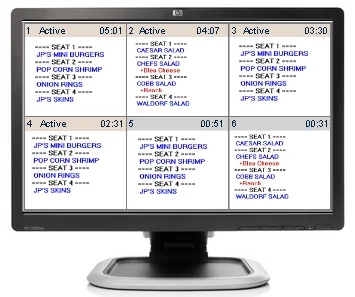
Kitchen Display, Simplified
Orders from the POS appear instantly on screen. Kitchen staff bump completed items with a touch. No paper, no bump bars, no delays.
Any Monitor Becomes a KDS
Turn any LCD, LED, or touchscreen monitor into a kitchen display system. No proprietary KDS hardware required — use the screens you already have or pick up affordable ones off the shelf.
Target Time Alerts
Set ideal prep times for each order. If an order isn't bumped before the timer expires, the status box changes color and flashes — keeping your kitchen moving and highlighting bottlenecks.
Touchscreen Bump
Replace expensive bump bars with touchscreen monitors. Kitchen staff tap to bump completed orders — more intuitive, easier to clean, and far cheaper to maintain than dedicated KDS hardware.
Flexible Order Routing
Route orders to the right station automatically — by POS terminal, menu category, or destination. Grill items go to the grill screen, drinks go to the bar screen, appetizers go to the cold station.
Drive-Thru Ready
Built for the speed demands of drive-thru operations. Orders display the instant they're entered, keeping your team organized and customers moving through the lane quickly.
Fully Customizable Layout
Configure rows, columns, colors, font sizes, and sorting order for each display station. Every kitchen is different — WinVue adapts to yours, not the other way around.
How WinVue Works
From POS to plate — orders flow through your kitchen without a single piece of paper.
Order Entered at POS
Server or cashier enters the order on any WinRest terminal or tablet. Items are tagged by category and destination.
Routed to Kitchen Screen
WinVue instantly routes items to the correct kitchen station. Timer starts counting. Color-coded grids keep everything organized.
Bump When Complete
Kitchen staff tap the touchscreen to mark items done. The order clears, the next one moves up. No paper, no confusion.
Why WinVue
Affordable kitchen display software that integrates directly with WinRest POS.
- Eliminate recurring paper and printer costs
- No expensive KDS hardware or bump bars
- Clearer than handwritten tickets
- Runs on workstation or standalone PC
- Lockable settings prevent accidental changes
- Mass order functionality for large tables
- Smaller footprint than traditional KDS
- 24/7 technical support
Ready to Upgrade Your Kitchen?
Ditch the paper tickets and bump bars. See how WinVue speeds up your kitchen.